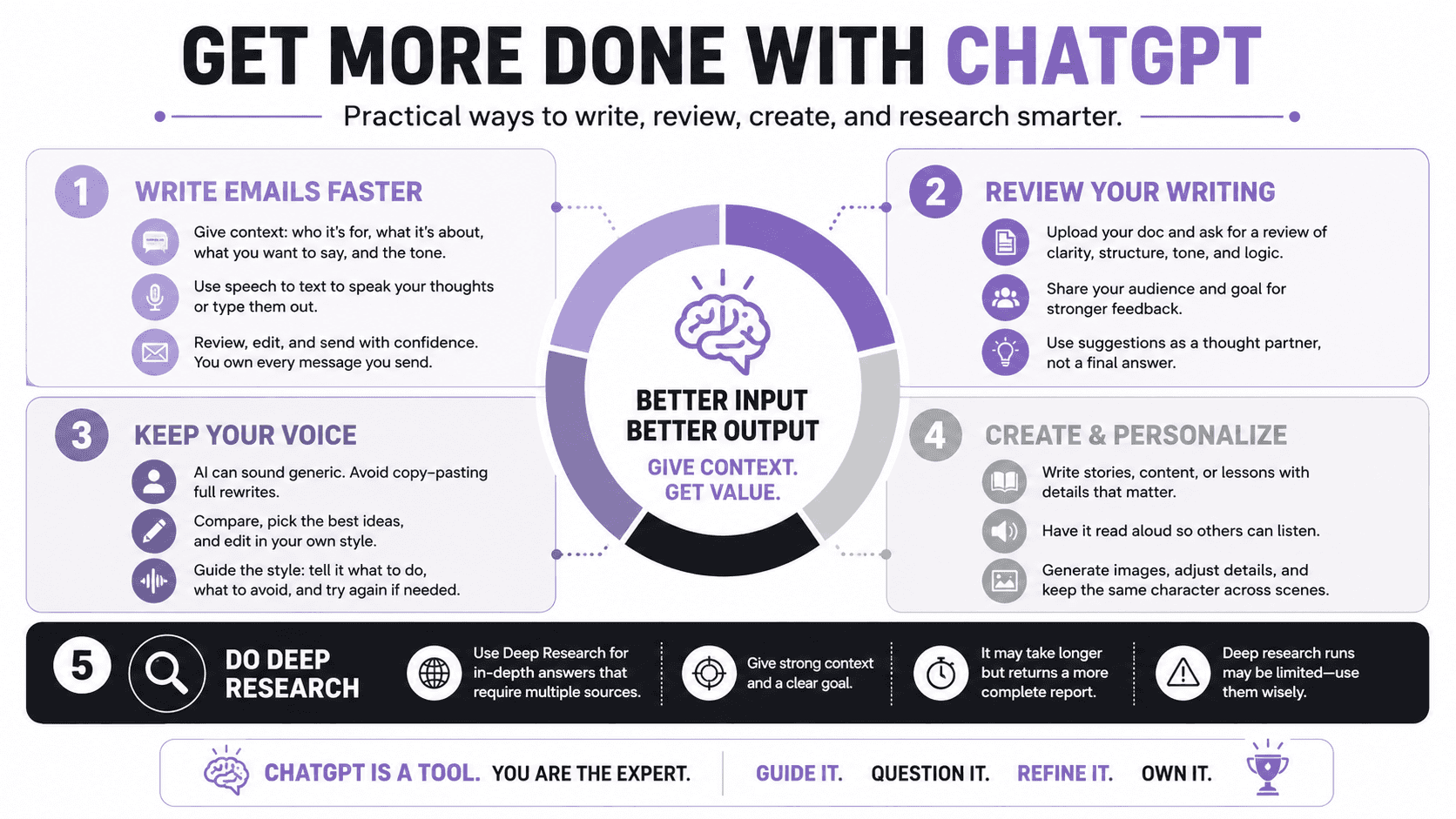

One practical way to use ChatGPT is to help write emails. A simple prompt like “write an email” can work, but it works much better when you give ChatGPT enough context. Context means the details it needs to understand the situation, such as who the email is for, what you are responding to, what you want to say, and how you want the message to sound. Tone means the style or feeling of the message, such as professional, friendly, direct, or warm.
A helpful workflow is to keep your email open on one side of the screen and ChatGPT open on the other. You can type your thoughts, or you can use speech to text, which lets you speak and have your words turned into text. This is useful when you know what you want to say but do not want to spend extra time shaping every sentence, fixing grammar, or formatting the message. For many people, saving a few minutes on one email may not sound like much, but it can make a big difference when they handle many emails every day.
Some advanced setups can connect ChatGPT to an email account, such as Gmail, so a draft can appear in a small window and possibly be sent from there. Many beginners will not use that setup at first, and that is completely fine. The simpler version is to ask ChatGPT for the email draft, copy the text, paste it into your email, and edit it before sending. This still gives you the main benefit, which is getting a clean first draft faster.
Even when ChatGPT saves time, you still need to review the message carefully. Once an email goes out under your name, you are responsible for it. Check that the facts are correct, the wording sounds like you, and the message says what you truly mean. ChatGPT can help with grammar, structure, and clarity, but you should always make the final decision before you send anything.
ChatGPT can also review writing that you have already created. For example, you can upload a document, such as a blog post, and ask ChatGPT to review it for clarity, structure, tone, and logic. Clarity means how easy the writing is to understand, while structure means how the ideas are organized. You will usually get better feedback when you also explain the audience, the goal of the writing, and what kind of review you want.
When ChatGPT reviews your writing, treat it like a thought partner, not the final authority. A thought partner helps you see ideas from another angle and notice things you may have missed. It might point out that an important definition comes too late, that a section feels confusing, or that the flow could be stronger. You can then bring those suggestions back to your own judgment or your team before deciding what to change.
Be careful about copying and pasting a full rewritten version from ChatGPT without editing it. AI-written text can sometimes sound polished but generic, which means it may look smooth but not feel personal or original. It may use repetitive patterns, short robotic sentences, or a rhythm that does not match your usual voice. A better approach is to compare your original version with ChatGPT’s version, borrow the useful improvements, and keep the final writing in a style you can fully stand behind.
You can guide ChatGPT toward your preferred style by giving specific instructions and revising your prompt as needed. For example, you might ask it to sound plain spoken, confident, simple, and direct. You can also tell it what not to do, such as avoiding very short sentences, avoiding em dashes, or keeping each paragraph to four or five sentences. If the first result is not right, stop the response, edit your prompt, add the missing instructions, and try again.
ChatGPT is not only useful for work tasks, it can also support creative and personal projects. You can ask it to write a short story for a child by giving details like the child’s age, favorite topics, sense of humor, and who should appear in the story. Some features can read the story out loud, which turns the written story into something a child can listen to. You can also ask ChatGPT to create images for the story, then adjust details, change the image shape for a phone or screen, download it, share it, or request several images that follow the same character through different scenes.
For more advanced tasks, ChatGPT can help with deep research. Deep research is useful when you need ChatGPT to search the web, gather many details, compare sources, and return a more complete research report. A quick search or faster thinking mode may take the most efficient route and miss important details, such as giving several rooms in one library when you actually wanted diverse venue options across a county. Before using deep research, give strong context and a clear goal, because it can spend much longer gathering information and may use a limited number of deep research runs available to your account.