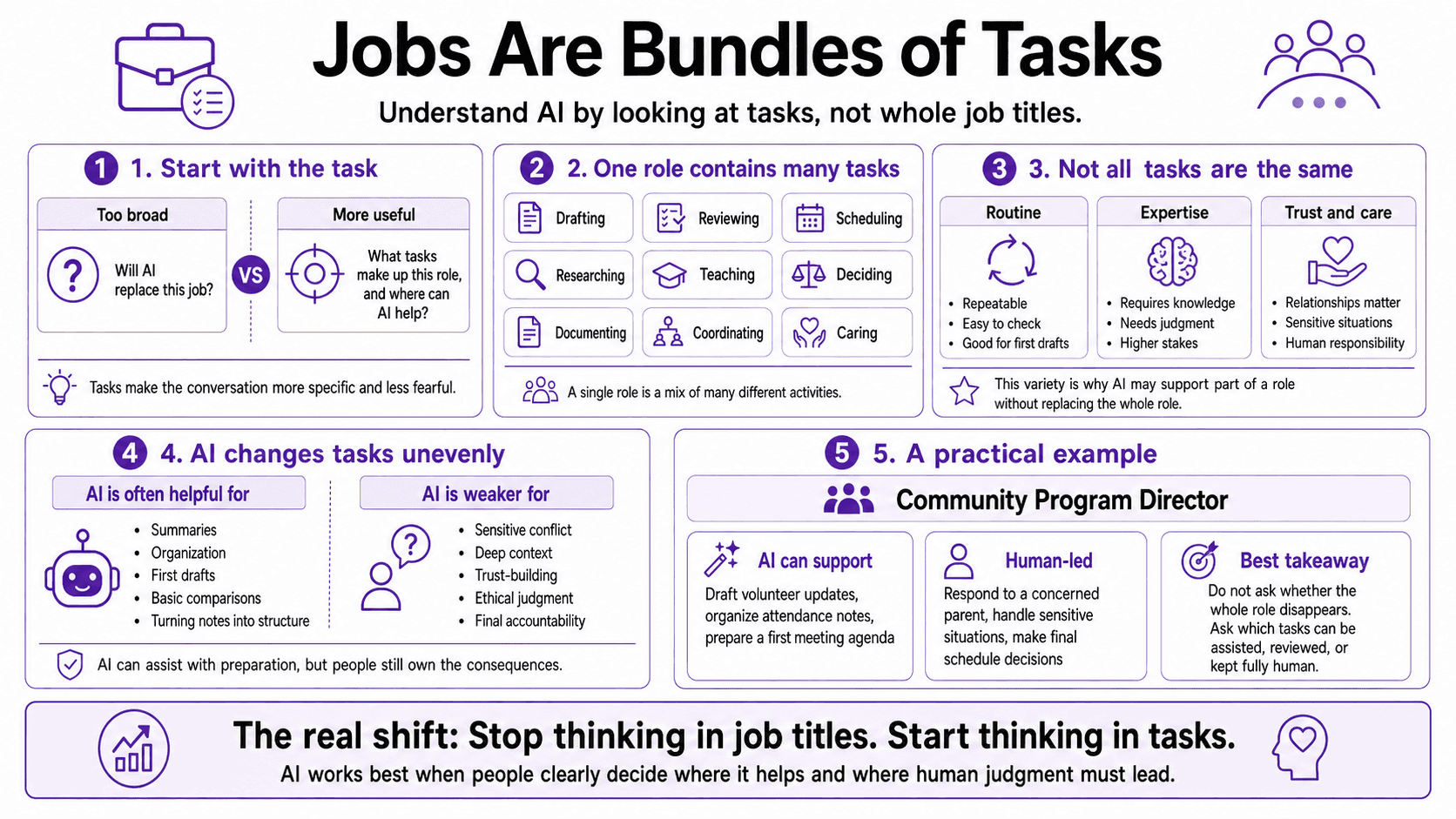
Before people can understand what AI can and cannot do, they need to look past the job title and examine the actual work being done. This is an important starting point because a job title can make work sound much simpler than it really is. A person may be called a manager, teacher, recruiter, assistant, pastor, director, coordinator, or analyst, but that title does not show what fills the day. Inside one role, a person may write emails, prepare reports, answer questions, schedule meetings, review information, support people, solve problems, make decisions, and handle unexpected issues. When people talk about AI only at the job-title level, the conversation becomes too broad and often becomes more fearful than helpful.
A better way to understand AI is to look at tasks. A task is one specific piece of work. Drafting a message is a task. Summarizing notes is a task. Calling a family, coaching an employee, reviewing a budget, leading a meeting, or deciding what to do in a sensitive situation are all tasks. Once the work is broken down this way, AI becomes easier to place. Instead of asking, “Will AI replace this role?” the better question becomes, “Which parts of this role could AI help with, and which parts still need human judgment?”
Most roles contain a mix of different kinds of work. Some tasks are routine and repeatable. They happen often, follow a clear pattern, and are easy to check. These may include formatting a document, preparing a meeting agenda, summarizing notes, organizing a list, drafting a basic email, or pulling information into a simple structure. These tasks are often good places to explore AI because the human can review the result and make changes before anything important happens.
Other tasks carry more weight. They require experience, care, trust, and responsibility. A leader may need to handle conflict between team members. A teacher may need to notice when a student is discouraged. A nonprofit director may need to decide how to speak with a funder honestly. A manager may need to make a fair decision about someone’s performance. These tasks are not just about producing words or organizing information. They involve people, context, consequences, and accountability.
AI does not affect every task in the same way. It is often helpful when the task involves language, structure, patterns, summaries, drafts, lists, or options. It can help turn messy notes into a clean outline. It can create a first draft of a follow-up message. It can summarize a long document so a person knows where to begin. It can suggest questions for a meeting, organize ideas into categories, or help someone compare possible next steps. In these cases, AI can reduce the blank page problem and give the human something useful to review.
But AI is weaker when the task depends on deep context, personal trust, moral responsibility, or final judgment. It may help prepare for a hard conversation, but it should not replace the human conversation. It may suggest wording for a sensitive message, but a person must decide whether the message is fair, accurate, and appropriate. It may summarize a complaint, but a leader still needs to understand the people involved and respond with care. AI can assist with preparation, but it does not carry the responsibility for what happens next.
Picture a community program director preparing for a busy week. She needs to write a volunteer update, review attendance notes, prepare talking points for a staff meeting, follow up with a concerned parent, and decide whether to change the schedule for an upcoming event. At first, all of this may feel like one big job called “program leadership.” But when she slows down, she can see the different kinds of tasks inside the role. Some are draftable. Some are organizational. Some are relational. Some require judgment.
She could use AI to draft the volunteer update, organize the attendance notes, and create a first version of the staff meeting agenda. Those are useful starting points because she can check the facts, adjust the tone, and make the language sound like her organization. But the concerned parent needs more than a polished response. That task requires listening, respect, and care. The schedule change also needs human judgment because it affects families, staff, transportation, safety, and trust. AI can help her think through the options, but she still has to make the decision.
The mistake many people make is treating AI as either a threat to the whole job or a solution for everything. Both views are too simple. AI may change part of a role without replacing the whole role. A recruiter may use AI to draft job descriptions and organize interview questions, but people still need to build trust with candidates and make fair hiring decisions. A teacher may use AI to create examples or summarize material, but students still need a human who can guide, encourage, correct, and respond in the moment.
This is why thinking at the task level lowers fear and improves decision making. It helps people see that some tasks may move faster, some may need stronger review, and some should remain clearly human led. The goal is not to hand over the role. The goal is to understand the work clearly enough to decide where AI belongs. That keeps people from using AI carelessly, but it also keeps them from avoiding useful support out of fear.
As AI helps with more routine tasks, the human part of work becomes even more important to name. If AI saves time on drafting, summarizing, and organizing, that saved time should not automatically become more busyness. It should create room for better thinking, deeper listening, stronger service, clearer decisions, and more careful review. The value of AI is not just speed. The value is what people do with the capacity it creates.
The strongest approach is to look at a role, name the tasks inside it, and sort them honestly. Which tasks are repeated often? Which tasks are easy to check? Which tasks could use a first draft? Which tasks involve sensitive information, major consequences, or people’s trust? Which tasks must stay human because they require care, ethics, judgment, or accountability? When people can answer those questions, AI stops feeling abstract. It becomes a practical tool that supports meaningful work without replacing the human responsibility at the center of it.