Most teams need better visuals, but not every team has the time, budget, or design support to create every post, flyer, banner, or client handout from scratch.
AI is no longer just a tool for writing emails or summarizing notes. It is becoming a practical way to create visual content, test ideas, and communicate more clearly. ChatGPT Image 2.0 helps small business owners and professionals turn plain-language instructions into useful images. That matters because most businesses need visuals every week, but not every team has the time, budget, or design support to create them from scratch.
The value is simple. You can describe what you need, and ChatGPT can help create a visual starting point. That might be a social media graphic, a flyer, a website banner, a product concept, a training visual, or a simple infographic. You do not need to know design software to begin. You need to know your audience, your message, and what the image should help people understand.
ChatGPT Image 2.0 is useful because it lowers the barrier between an idea and a visual draft. Many business owners know what they want to say, but they struggle to make it look clear and professional. This feature helps close that gap. It gives you a way to explore layouts, styles, messages, and visual directions before you spend more time or money on final design work.
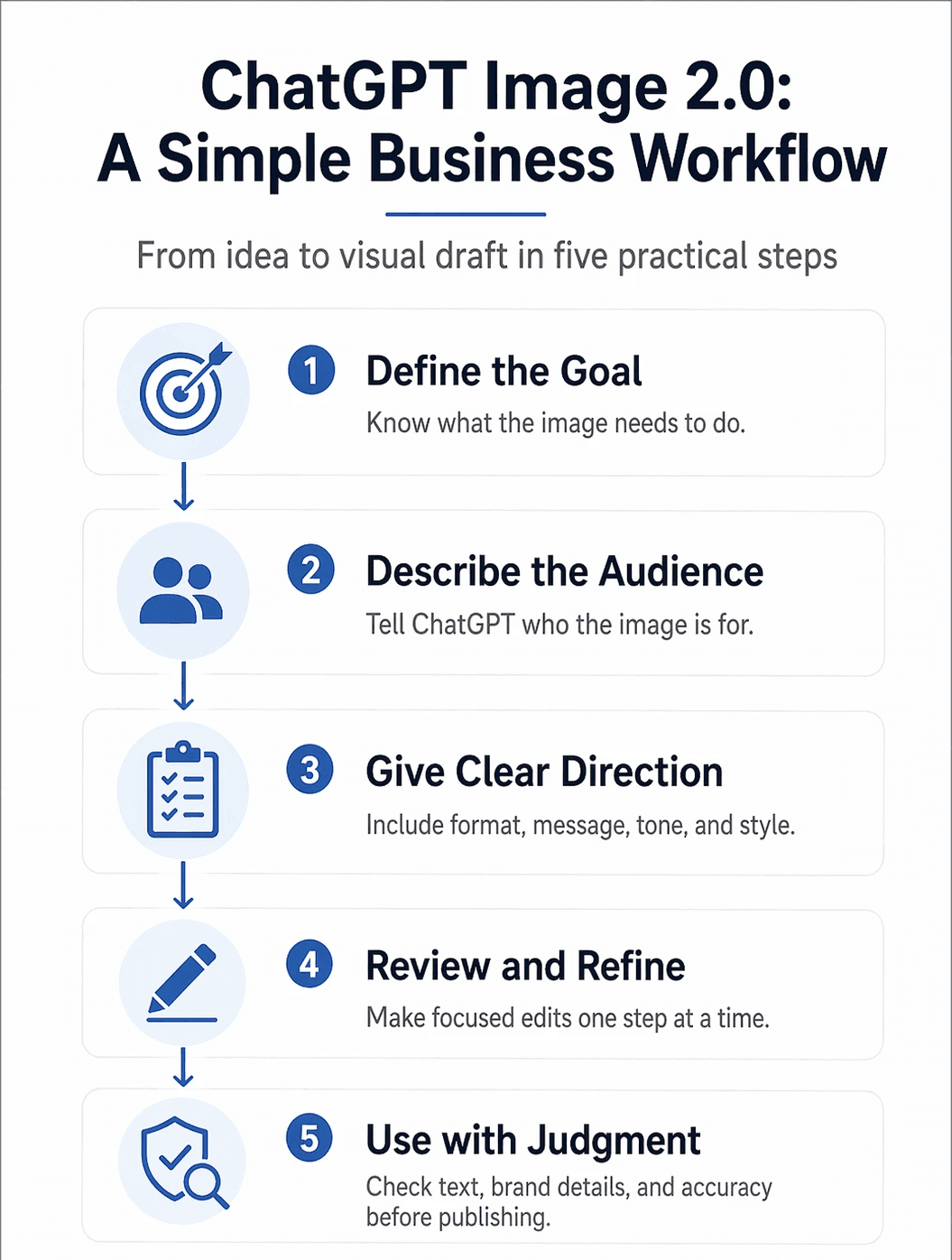
To use it well, start with a clear request. Tell ChatGPT what you are creating, who it is for, where it will be used, and what the image should include. A weak prompt says, “Make me a business graphic.” A stronger prompt says, “Create a clean LinkedIn graphic for a local bookkeeping firm. The audience is small business owners. The message is: ‘Know your numbers before tax season.’ Use a calm, professional style with simple icons and space for a logo.”
A good image prompt should include a few key details:
The purpose of the image
The target audience
The platform or format
The main message
The visual style
The mood or tone
Any text that must appear
Anything the image should avoid
The best way to work with ChatGPT Image 2.0 is to treat the first image as a draft, not the final answer. Ask for the image, review what works, then refine it. You can say things like, “Make the headline larger,” “Use fewer objects,” “Make the design feel more premium,” “Use a brighter background,” or “Keep the layout, but make it easier to read.” Small, specific edits usually produce better results than starting over with a completely new prompt.
For small businesses, the use cases are practical. A restaurant can create a weekly special graphic. A consultant can build a visual for a client workshop. A real estate agent can create a neighborhood guide cover. A coach can create a simple visual checklist. A nonprofit can draft campaign graphics before sending them to a designer. This is where the tool becomes useful. It helps you move faster without losing control of the message.
Strong business use cases include:
Social media posts for tips, offers, and announcements
Event flyers for webinars, workshops, and community events
Website hero images and landing page concepts
Product mockups for early-stage ideas
Simple training visuals for employees or clients
Infographics that explain a process
Brand concept boards for planning and direction
Presentation visuals for meetings and proposals
Here are a few prompts worth trying. “Create a square Instagram graphic for a local bakery announcing a weekend pastry box. Make it warm, modern, and simple.
Include the text:
‘Weekend Pastry Box, Preorder by Friday.’”
Another example is,
“Create a professional LinkedIn graphic for a leadership coach. The topic is better meetings. Use a clean office style, muted colors, and the text: ‘Meetings should create clarity, not confusion.’”
You can also try,
“Create a website banner for a boutique bookkeeping service that helps creative freelancers. Make it calm, trustworthy, and modern. No clutter.”
The feature is especially helpful when you need to explain something simple in a visual way. For example, a business consultant could create an infographic that shows the four steps of a client onboarding process. A trainer could create a visual checklist for new employees. A financial professional could create a basic guide that explains what documents clients should prepare before a meeting. These visuals do not need to be complicated. They need to be clear.
There are still things to watch closely. Review all text inside the image before publishing. Check dates, prices, phone numbers, legal claims, and brand details. Make sure the image matches your business tone. If your brand uses specific colors, fonts, or logo rules, include those details in your prompt. AI can help you create faster, but your judgment still matters.
The best results come when your team builds a simple process. Create the first draft in ChatGPT. Review it against your goal. Make focused edits. Save prompts that worked well. Build a small library of reusable prompts for social posts, flyers, website images, and client education pieces. Over time, this gives your business a faster and more consistent way to create visuals.
The takeaway is clear. ChatGPT Image 2.0 is not about making more content for the sake of making more content. It is about helping your ideas become easier to see, easier to understand, and easier to act on. Start with one real business need this week. Create a draft. Refine it. Use what works. That is how AI becomes practical.